NovoChats SMS Opt-In Workflow
Public verification page for carrier and campaign review
Who receives messages
NovoChats account operators may choose to receive operational text alerts when a website visitor submits a conversation handoff request. A mobile number entered by a visitor in the handoff form is provided for the website operator's follow-up; that visitor form does not enroll the visitor in NovoChats automated SMS. NovoChats does not send marketing messages through this program.
How operators opt in
- The operator signs in to NovoChats and opens the Conversation Handoff settings.
- The operator enters their own mobile number.
- The operator actively selects the unchecked consent box shown below.
- The operator saves the settings. NovoChats records the consent selection and time.
SMS remains disabled unless the operator selects the checkbox. Changing the mobile number clears the prior consent and requires the operator to opt in again.
Operator opt-in form
The screenshot below shows the production Conversation Handoff configuration presented to an authenticated operator. The SMS consent checkbox is unchecked by default.
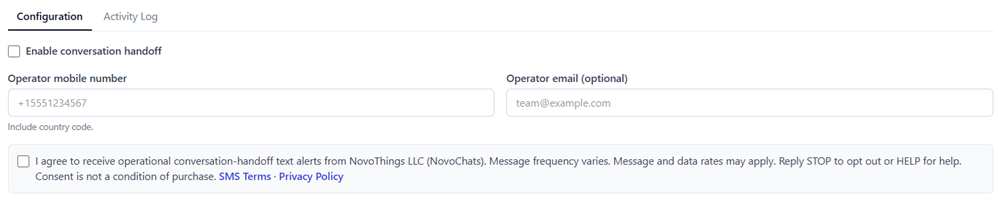
Select the image to open the full-size evidence.
Consent shown at mobile-number collection
This is a reviewer-accessible copy of the consent control in the authenticated Conversation Handoff settings.
I agree to receive operational conversation-handoff text alerts from NovoThings LLC (NovoChats). Message frequency varies. Message and data rates may apply. Reply STOP to opt out or HELP for help. Consent is not a condition of purchase. SMS Terms · Privacy Policy
The checkbox is unchecked by default and must be actively selected.
Opt out and support
Operators may reply STOP to stop messages, START to resume after opting out, or HELP for help. Support is also available at support@novochats.com.